The first step step is to get the right driver for your USB port. A CP210x USB to UART Bridge VCP Driver is needed. Silicon Labs has driver for free download for the Mac at: https://www.silabs.com/documents/public/software/Mac_OSX_VCP_Driver.zip
A complete set for drivers for multiple platforms can be found here: https://www.silabs.com/products/development-tools/software/usb-to-uart-bridge-vcp-drivers.
Download the driver and run the install package before doing the other steps.
Before making any changes, I recommend that you save the existing radio configuration to the SD card, so that if things don't work out you can go back to a known working configuration.
I used the settings I found from WA7EWC IC-7300 setup
I set the power level to 50% for digital modes.
Once you have made the changes, save the new configuration to the SD card. Name it something obvious, like "fldigi."
Open the Settings -> Connectors menu. Here is what they look like on my machine.
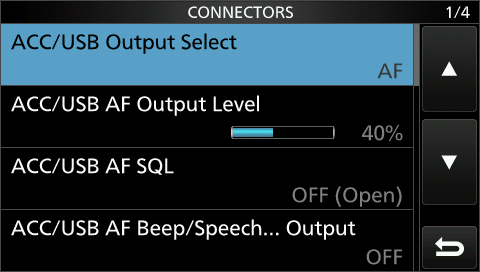
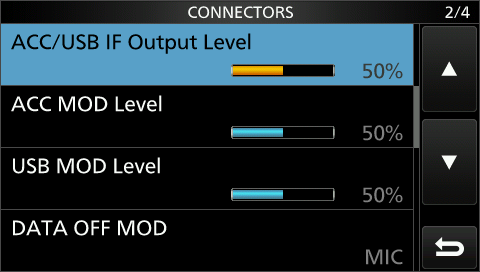
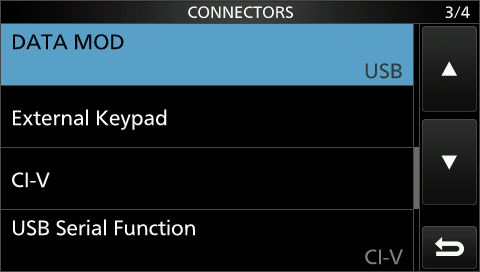
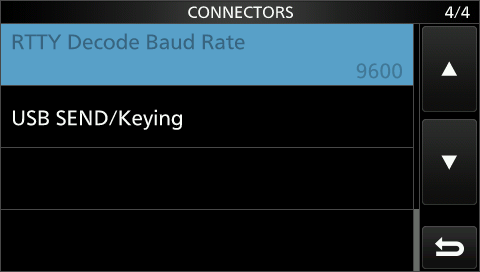
I am using version 4.104
Using RigCat, one can do everything with a single USB connection with no other wires required. I tried using the flrig companion program, but found that it would get out of sync with radio and would make unexpected changes to the filters that would persist after quitting the program.
Basically, I followed the instructions from WA7EWC fldigi setup again.
Before setting up fldigi, you will need an xml rig definition file. Hamlib does not have a setting choice for the 7300, so you will need to download one and use it for your RigCAT settings. The 7300 xml file can be found at: https://sourceforge.net/projects/fldigi/files/xmls/icom/
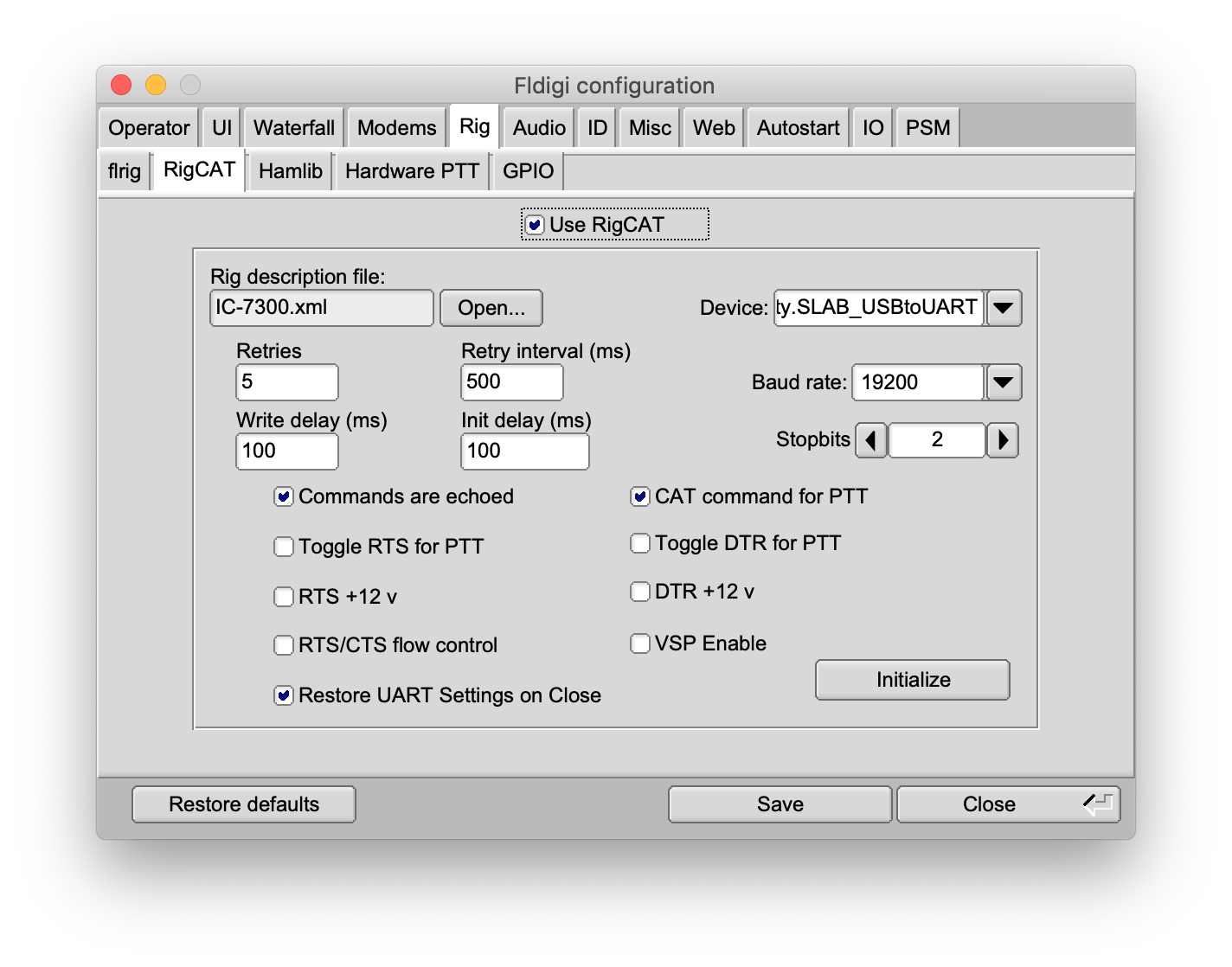
Open the Configure menu and the Rig Control sub-menu
Click the open button for the Rig description file and select the IC-7300.xml file that you have already downloaded. Then for device select the USB to UART driver you have already installed on your Mac. Set the baud rate to 19200
Make sure the followint boxes are checked:
Use RigCAT
Commands are echoed
CAT command for PTT
Restore UART settings on Close.
Plug your USB cable from the computer to the 7300 and click Initialize.
Click the Save button followed by the Close button.
Hopefully you will be good to go after that.
I have successfully made both RTTY and BPSK31 QSOs. No problem there.
The only difficulty I have is that there are so many different modes and it is hard to identify which is which. Fldigi has a RXID function which uses the Reed Solomon (RSID) protocol, but I have not yet gotten that to actually identify a signal.
I am unsure if I am missing some subtle configuration adjustment, or if people are simply not transmitting signals with the RSID. I will need to find some local ham who will experiment with me on this.